Military Retirement
- 4.7
- Rating
- 10.00K
- Installs
- $5.99
- Price

 Analysis by App-foxy
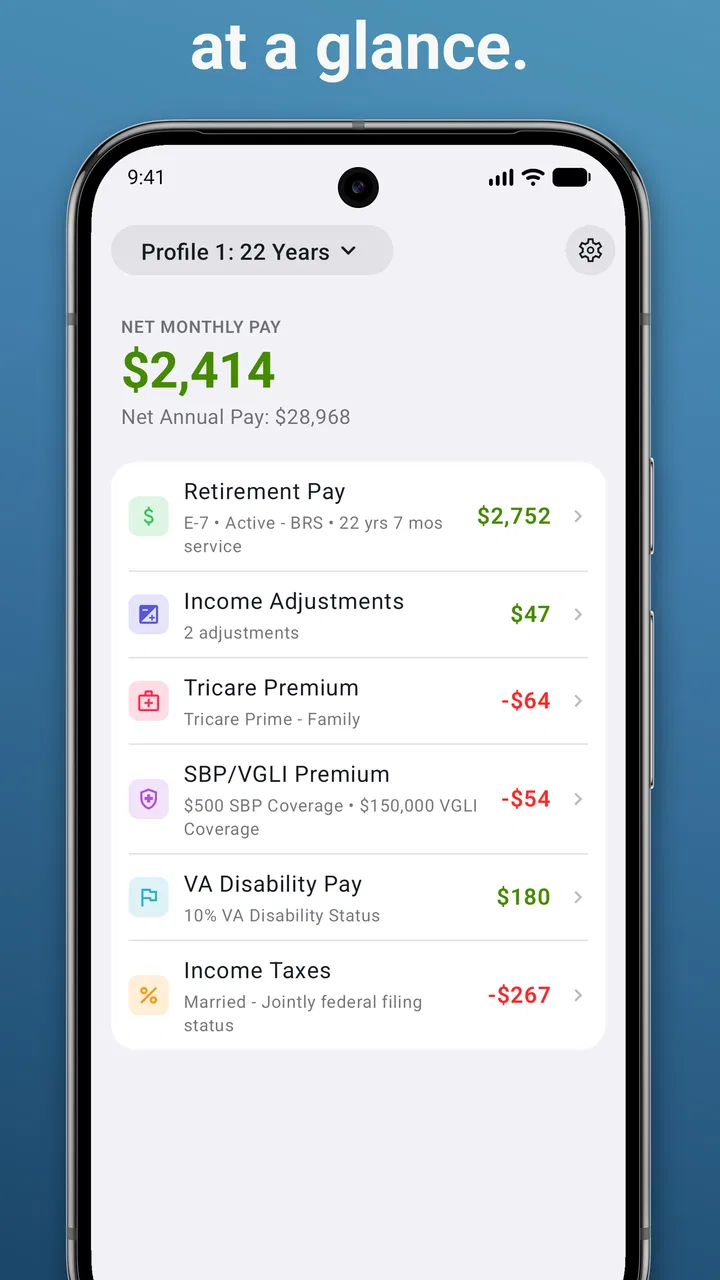
Planning for military retirement can feel abstract until you put real service details into a calculation and see how different choices affect the result. Military Retirement is a focused finance app from LYNNFIELD LLC that turns that first estimate into a more approachable task. I found its main appeal in the narrow purpose: instead of asking you to build a retirement model from scratch, it gives you a dedicated place to work through military retirement pay estimates.
That focus makes it easier to begin, especially if you are opening a calculator like this for the first time. It is not a general budgeting app, an investment tracker, or a complete retirement-planning service. I would treat it as a practical estimation tool for exploring possibilities, not as the final authority for an official benefits decision. Used that way, it can help you prepare better questions and understand the effect of changing important assumptions.
What to expect before you begin
The app sits in the finance category, but its job is much narrower than most finance apps. Its store summary describes it as a military retirement pay estimation calculator, and that is the right expectation to carry into the first launch. You are not downloading a broad personal-finance dashboard with spending charts and account connections. You are opening a purpose-built calculator for a specific planning problem.
You May Also Like

 AccuWeather: Weather Radar
AccuWeather Review: A Quick, Clear Forecast for Everyday Decisions
For everyday plans, the best forecast is the one you can understand quickly. AccuWeather makes rain timing, radar, and local conditions easy to act on, with a few trade-offs.

 Hill Climb Racing
Why Hill Climb Racing Still Turns Crashes Into One More Run
A tiny car, a bumpy hill and one more upgrade: Hill Climb Racing keeps resurfacing because its simple chaos makes every near-miss feel personal.

 AliExpress - Shopping App
AliExpress Makes Global Shopping Feel Personal, but Shoppers Bear the Risk
AliExpress turns a global marketplace into a pocket-sized discovery engine. Its reach is useful, its shopping loop compelling, and its trade-offs easy to miss.

 Lords Mobile: Kingdom Wars
Lords Mobile Is a Kingdom-Building Routine, Not a Quick Match
A case-by-case verdict on the building, battles, device demands, and social commitments that make Lords Mobile rewarding for some players and exhausting for others.

 PDF Scanner app - TapScanner
TapScanner Makes Paperwork Easier to Capture, Check, and Share
TapScanner makes scanning with a phone feel less like a rescue operation and more like a dependable step in getting work done. Its capture tools are useful, though not flawless.

 Block Blast!
 Shows How Much a Puzzle Game Can Leave Out
A quiet grid game shows why puzzle players increasingly value instant clarity, repeatable skill and low-pressure play—and where the genre still needs to catch up.
More From Our News Desk
View All News


That narrow scope is a strength when you already know why you are there. A service member comparing retirement possibilities can concentrate on service-related inputs instead of sorting through unrelated tools. Someone looking for help with everyday bills, savings goals, debt repayment, or investment performance should skip it, because those are outside the reason I would choose this app.
The price is $5.99, so I would make the decision based on usefulness rather than treating it as a free experiment. The app has a 4.7 average from around 873 ratings and about 298 written reviews, which suggests that many users find the focused approach worthwhile. It has also passed 10K+ installs, enough to show that it serves a real niche, though it is not trying to be a mass-market finance platform.
Its Everyone content rating makes it approachable from an age-rating perspective, while the listed minimum operating system is 7.0. The current version is 2026.7, and the developer is LYNNFIELD LLC. Those details matter most when you are checking whether the app fits your device and whether its maintenance looks current enough for your own comfort.
I would still begin with a notebook or a note on your phone beside you. The most useful result will only be as good as the service information you enter. Before launching the calculator, gather the details you normally use when discussing retirement: your service history, the relevant pay information, and the scenario you want to test. If you are unsure which figure belongs in a field, do not guess just to make the calculation move forward. Write down the uncertainty and verify it through an official source or a qualified benefits adviser.
Why a dedicated calculator can beat a spreadsheet at the beginning
A spreadsheet gives you flexibility, but that flexibility can become a problem during a first estimate. It is easy to mistype a formula, reference the wrong cell, or create a result that looks precise while hiding an incorrect assumption. A dedicated military retirement calculator can provide a clearer starting structure, particularly for someone who wants to compare scenarios without designing the calculation themselves.
The trade-off is that a specialist calculator may feel less adaptable than a spreadsheet once your questions become complicated. If you need a complete household plan combining several income sources, taxes, insurance, investments, and changing expenses, I would move beyond this app rather than forcing it to serve as an entire financial model.
Getting through the first setup without guessing
My recommended first session is deliberately simple. Open the app with one clear question, such as, “What might my retirement pay look like under this service scenario?” Do not begin by trying to model every possible future at once. A single clean estimate gives you a baseline that you can revisit after you understand how the calculator responds to your entries.
Enter the information carefully and pause at each field. Military retirement calculations can be sensitive to details that look small on the screen. A difference in service time, pay basis, or the way a scenario is interpreted can change the estimate. The important habit is to separate known inputs from planning assumptions. If you are estimating future service or using an expected pay figure, label that mentally as an assumption rather than treating the output as guaranteed income.
One useful workflow is to prepare two separate notes before entering anything. In the first, list the figures you believe are confirmed. In the second, list the figures you are using only for planning. This prevents a convenient estimate from quietly becoming the number you quote later to a spouse, lender, or adviser as though it were official.
For a first-time user, the best setup is not the most detailed one; it is the one you can explain afterward. When the result appears, you should be able to say which service and pay assumptions produced it. If you cannot reconstruct the scenario, the number will be difficult to trust or compare later.
The first meaningful success: create a baseline you can reuse
The first successful action is not merely getting a figure on the screen. It is producing a baseline that answers a real planning question. For example, you might enter your current best understanding of your situation, record the resulting estimate in a personal note, and write down the assumptions beside it. That gives you something useful even before you explore alternatives.
After that, change one major input at a time and compare the result with your baseline. This is one of the most valuable ways to use a calculator like this because it shows which assumptions deserve your attention. If you change several values together, you may get a different result without knowing which change caused it. One-variable comparisons are slower, but they create much better questions for a follow-up conversation.
A realistic everyday example would be a service member preparing for a household budget discussion. Instead of telling a partner that retirement income will be “about” a certain amount, the user can build a baseline, test a second service scenario, and discuss the difference as an estimate. That does not replace official paperwork, but it makes the conversation more concrete. It can also reveal whether the household budget depends too heavily on an optimistic assumption.
Another practical use is preparing for a meeting with a retirement counselor. Bring the inputs you used, the estimate you received, and the specific alternatives you tested. The app becomes more valuable when it helps you arrive with organized questions rather than when it is treated as a one-tap answer machine.
Common points of confusion during estimation
The biggest source of confusion is the difference between an estimate and an entitlement. The app helps you explore military retirement pay, but a calculator result should not be mistaken for an official determination. I would use the number to understand direction and scale, then confirm important decisions through authoritative military retirement resources or professional advice.
A second issue is false precision. A result displayed as a clean amount can feel more certain than the information behind it. If one of your inputs is projected, incomplete, or based on an interpretation you have not verified, the output inherits that uncertainty. I prefer to record a short explanation beside every result: what I entered, what I assumed, and what still needs confirmation.
Users may also wonder whether this app can replace a full retirement plan. In my view, it cannot, and that is not a criticism of its purpose. A pay estimate is only one part of retirement readiness. Your household may also need to consider taxes, healthcare costs, location, debt, savings, other income, and the timing of major expenses. A general financial-planning tool or a spreadsheet is better for combining those elements, while this app is better for isolating the military retirement-pay question.
Another reasonable question is whether the app is suitable for someone who has not yet made a retirement decision. Yes, that is one of its better use cases, provided you treat the scenarios as planning exercises. Testing several possibilities can help you understand what information matters before you commit to a choice. It is less suitable for someone who wants a definitive answer without knowing the inputs or checking them.
If you are wondering whether the $5.99 purchase is worthwhile, I would ask how often you expect to revisit this question. For a service member actively comparing retirement paths, preparing a budget, or checking the effect of changing assumptions, a dedicated calculator can justify the cost through repeated use. If you only want a broad overview and do not expect to enter personal scenarios, official guidance or a professional consultation may offer better value.
Three habits that make the results more useful
First, keep a dated personal record of each scenario, even though the app itself is focused on calculation rather than becoming your complete planning archive. Write a simple label such as “current estimate” or “alternative service assumption,” then include the inputs and output in your own notes. This prevents you from comparing a carefully checked scenario with an older result whose assumptions you no longer remember.
Second, test sensitivity instead of chasing a single attractive number. Change one assumption, return to the baseline, and observe the difference. This shows whether your planning decision is driven by a major factor or by a small adjustment. The insight is more useful than simply choosing the highest-looking result, because it tells you where verification effort matters most.
Third, use the calculator before—not after—a benefits conversation. If you wait until someone asks you for details, you may rush through the entries and forget which figures were estimates. Running a few thoughtful scenarios beforehand lets you ask focused questions, such as which service information should be used or which pay figure is appropriate for the situation you are modeling.
There is also a fourth habit I recommend: never let the app become the only place where your retirement assumptions live. Keep your own notes and source documents organized separately. That makes it easier to revisit the calculation if your circumstances change, and it protects you from relying on memory when you return to the app months later.
Where this app fits among the usual alternatives
Compared with a general retirement-planning app, this calculator is more direct. A broad planner may be better at showing household cash flow, long-term savings, or multiple income streams, but it can require more setup before you reach the military retirement question. Military Retirement is appealing when your immediate need is a focused pay estimate rather than a complete financial picture.
Compared with a spreadsheet, it should be easier to approach if you do not want to build formulas yourself. A spreadsheet wins when you need custom projections, side-by-side household budgets, or unusual assumptions. It also gives you a visible calculation structure that you can inspect and modify. The dedicated app wins on concentration: you can spend your time thinking about the scenario instead of designing the tool.
Compared with official resources, the app is more convenient for quick “what if” exploration, but official sources remain the place I would turn to for confirmation. Convenience and authority are not the same thing. The best workflow combines them: use the app to frame the question, then use official documentation or an adviser to validate the answer before making an irreversible decision.
I would not recommend it as the only finance app on your phone. Its value comes from being specific, not comprehensive. Someone who wants one application for budgeting, investments, bill reminders, and retirement income should choose a broader solution and use a specialist calculator only when needed.
Who should use it and who should pass
I think it is a good fit for active-duty service members, veterans, and households trying to understand military retirement pay scenarios in a more structured way. It is especially useful for a first pass, for comparing one assumption against another, and for preparing a clearer discussion with a spouse or adviser.
It is also a sensible choice for users who prefer a dedicated tool over a homemade spreadsheet. The focused design can reduce the mental load of starting from a blank document, and the cost is easier to justify if you expect to revisit several planning questions.
I would pass on it if your main goal is general personal finance. It is not the right place to manage spending, track investments, or build a complete household retirement forecast. I would also pass if you need an official benefits decision rather than an estimate. In that situation, the app may help you prepare, but it should not be the final step.
My final take after using it as a planning companion
Military Retirement succeeds by staying close to one practical problem: estimating military retirement pay. I like that its usefulness does not depend on turning it into a giant financial dashboard. For a first-time user, the reassuring path is straightforward: gather your information, build one understandable baseline, test one change at a time, and keep the result in context.
The limitations are equally important. A dedicated calculator cannot resolve uncertain inputs for you, and a neat estimate is not the same as an official figure. It also will not replace the broader work of planning taxes, healthcare, savings, debt, and household spending. Those boundaries mean the app works best as a focused companion rather than a complete retirement system.
At $5.99, I would recommend it to someone who has a specific military retirement question and expects to revisit the calculation. I would not recommend buying it simply because it sounds like a general retirement planner. If you approach it with verified inputs, written assumptions, and a willingness to confirm important results elsewhere, it can turn a vague retirement concern into a concrete next step—and that is where I found its real value.
FAQs for Military Retirement
01What is Military Retirement, and what can I use it for?
Military Retirement is designed to help service members, veterans, and eligible beneficiaries review retirement-related information in one place. Depending on your branch, country, and account access, it may provide pension estimates, payment details, service history, benefit information, and useful retirement resources. The exact features can vary, so users should confirm that the app supports their military organization before downloading.
02Who can use the Military Retirement app?
The app is generally intended for military personnel, retired service members, veterans, and other authorized users who need access to retirement or pension information. Some sections may be available without signing in, while personal records usually require identity verification and an official account. Eligibility, supported services, and available tools may differ by country, branch, or retirement program.
03Is my personal and financial information secure in Military Retirement?
Because retirement applications may contain sensitive identity, service, and payment information, security is an important consideration. Military Retirement may require secure sign-in, verification codes, or other authentication methods before displaying personal records. Users should download the official version from a trusted store, avoid sharing login details, keep the app updated, and use a secure network when accessing account information.
04Can I calculate or check my military retirement benefits with the app?
Many military retirement applications include tools for reviewing estimated benefits, pension payments, service credit, or retirement eligibility. However, estimates should not be treated as an official determination because calculations can depend on rank, years of service, retirement system, disability status, regulations, and other factors. Always compare the information with official records or contact the appropriate military benefits office.
05Is Military Retirement free to download, and does it require an account?
The application may be free to download, although certain features could require an official military or government account. Registration, identity verification, or access approval may be necessary before viewing personal retirement data. Users should review the app-store listing for current pricing, supported devices, privacy information, and any in-app requirements, and should be cautious of unofficial apps requesting unnecessary payments or personal details.
Pros
- Includes military-specific retirement planning guidance.
- Helps estimate potential retirement income and benefits.
- Useful for comparing different retirement scenarios.
- Presents complex pension information in an accessible format.
- Can support better long-term financial decision-making.
Cons
- May not reflect the latest changes to military retirement rules.
- Results depend on accurate personal and service information.
- Some features may require an internet connection.
- Not a substitute for official military benefits advice.
- Could be less useful for users outside the supported military systems.

Military Retirement
Gallery